Anycubic Slicer MCP

An MCP server for Anycubic Slicer Next. Tell your AI agent what to print and it slices your STL, 3MF or STEP file, shows you the toolpaths and gives you the time and filament. You still press print.

Or click your app to copy just its setup.

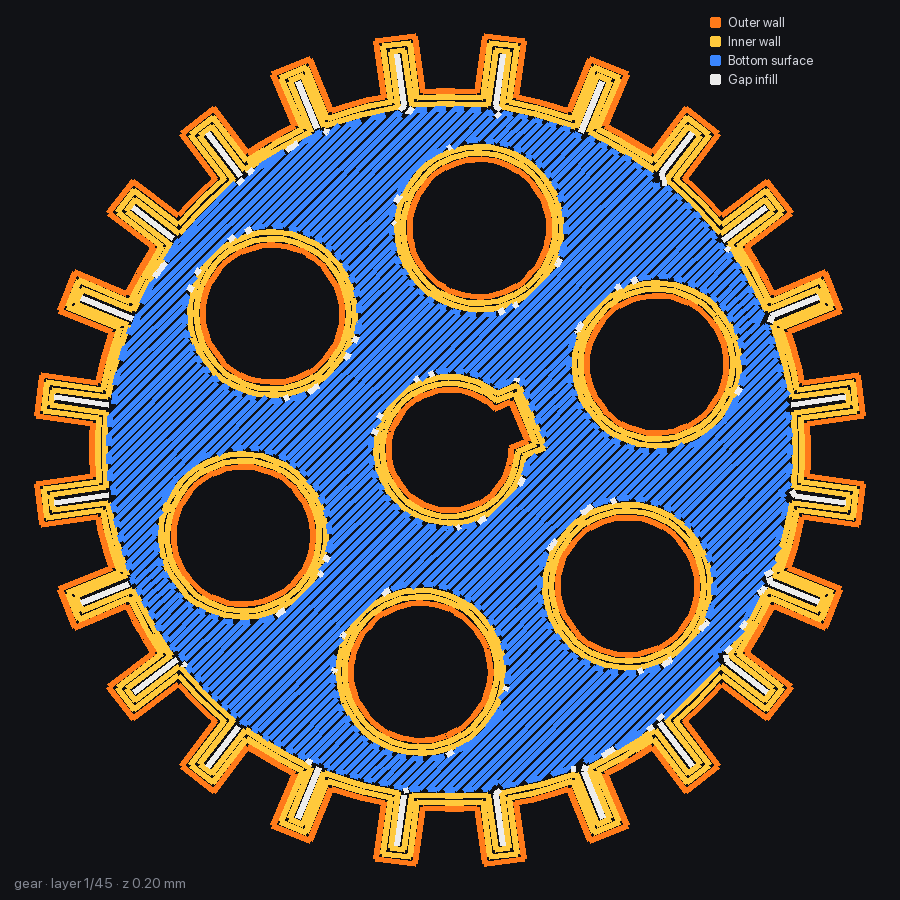
One layer of a sliced gear drawn in blue: outer walls, inner walls and wavy gyroid infill, stacked on the layers below it

Real runs

Ask for a print in a sentence.

Each of these ran on a Kobra X with the real slicer. The numbers are what the tools returned.

Slice gear.stl for my Kobra X. 20% gyroid, three walls.

AI
slice_model(models=["gear.stl"], overrides={"sparse_infill_density": "20%", "sparse_infill_pattern": "gyroid", "wall_loops": 3})

Done. It's a short print. Here is layer 12 so you can see the walls and infill.

Layer 12 of the sliced gear: orange outer walls, yellow inner walls and red gyroid infill
Print time
30m 48s
Filament
9.66 g PLA
Layers
45 × 0.2 mm
Infill
20% gyroid
Walls
3
Printer
Kobra X 0.4 nozzle

Previews

See every layer before the nozzle heats up.

The first layer

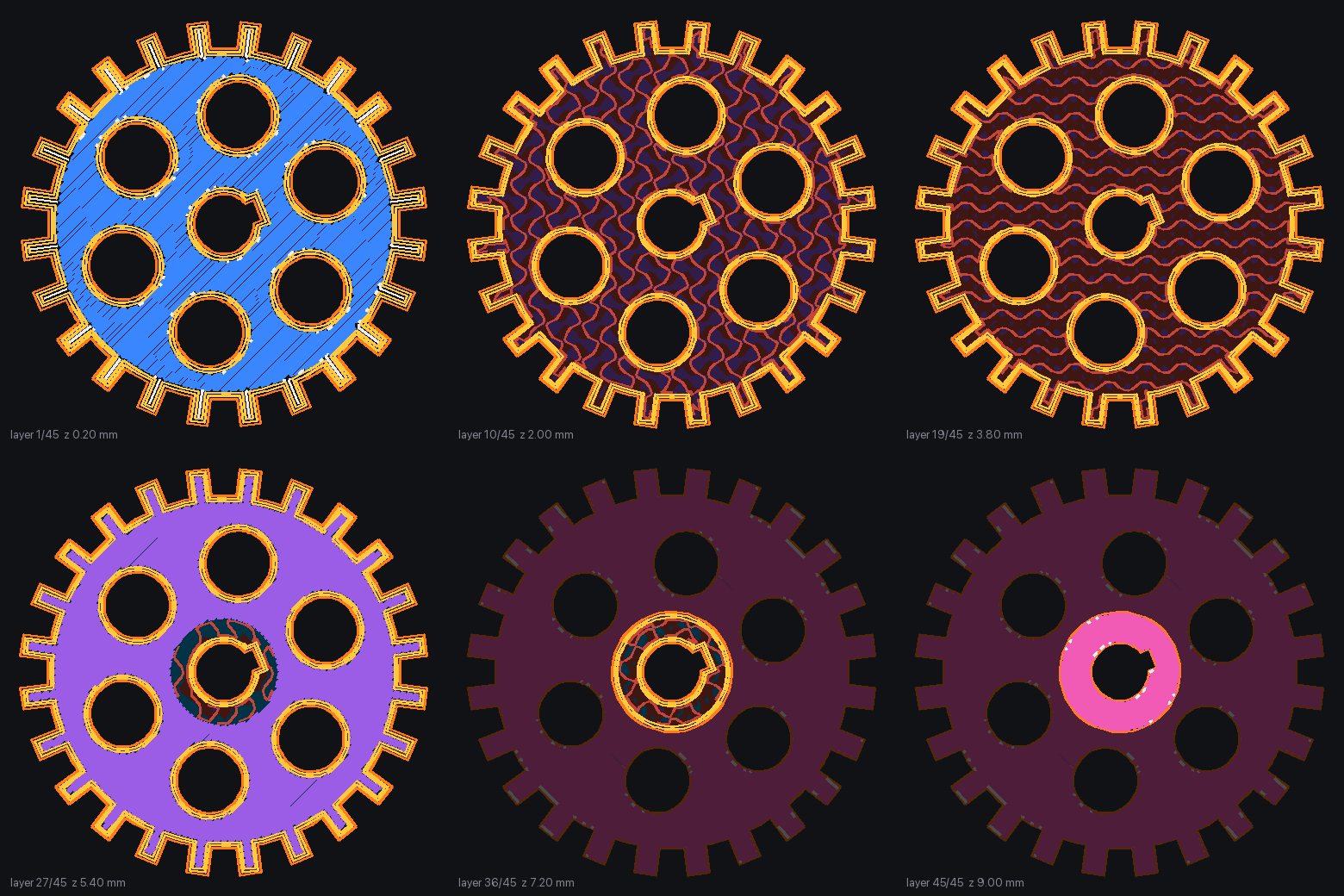
Check the first layer's walls and fill before anything else. Most failed prints start here. preview_gcode draws any layer coloured by feature.

Any layer, up close

Pick layer 12 or layer 40. Outer walls, inner walls, infill, bridges and supports each get their own colour, so a thin wall or a missing bridge is easy to spot.

The whole part at once

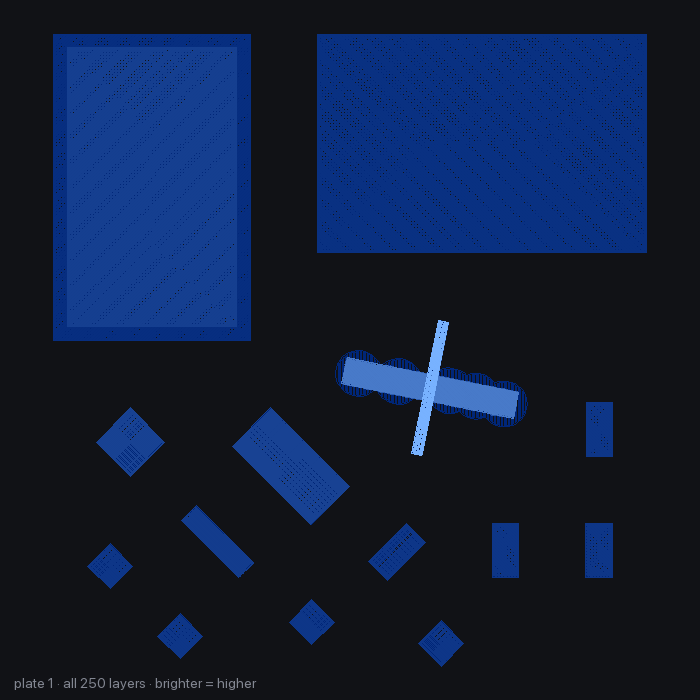
Every layer stacked and shaded by height. Lighter means higher. It's the quickest way to confirm the part sits where you expect on the bed.

From the side

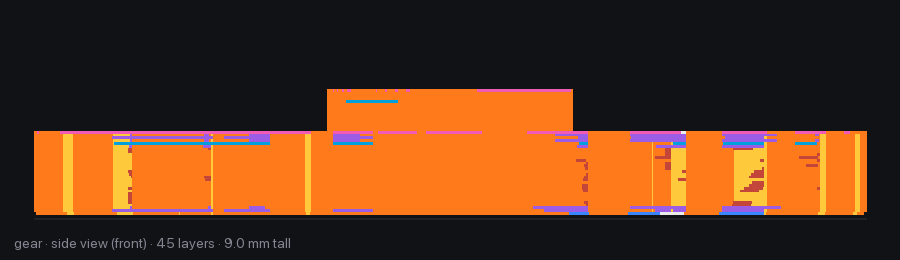
A front elevation of the print, so overhangs and supports show up at a glance.

Watch it build

animate_layers saves a GIF of the print going up layer by layer. print_card makes a 1200×630 summary you can drop into a chat or an order.

Beyond slicing

The jobs that used to eat your evening.

Filament profiles, failed 3D prints, weak parts and wasted filament. Hand them to the agent and it does the fiddly part with the slicer you already use.

Hand it the whole project.

Point the agent at a folder or a .zip of parts. plan_project finds every model, reads counts from names like clip_x4.stl and from the README, lays each part in its best orientation and packs them onto plates. Group for the fewest plates or by colour, keep plates under a time limit, and keep parts that need supports together.

plan_projectslice_project

It asks before it guesses.

  • Two versions of the same partwhich one?
  • A part 1.6 mm wideinches?
  • Bigger than the bedscale or skip?
  • No count anywhereone of each?
  • Looks like a test pieceleave it out?

Nothing is sliced until you've answered the questions that matter and approved the plates.

Snap the spool label. Get a filament profile.

Send a photo of the label. The agent reads the brand, material, colour and temperature ranges, and create_filament_profile builds a preset from them, starting from the closest one your printer already has. You see a preview first and nothing is saved until you say so. Anything the label doesn't say gets a typical value for that material, and the agent tells you which ones.

create_filament_profileadd_spoollist_spoolsupdate_spool
name      Example PETG Galaxy Black
inherits  Anycubic PETG @Kobra X 0.4
nozzle    240 °C, first layer 245 °C
bed       75 °C
colour    #1B1B1F
density   1.27 g/cm³
saved     not yet (preview)

The preview for a PETG label that reads 230 to 250 °C nozzle and 70 to 80 °C bed. Spools also go into a small inventory on your computer, so later the agent can tell you which one has enough left for a print.

Show it the failed print.

Stringing, warping, split layers, a messy first layer. The agent looks at your photos and matches them to one of 13 known defects. diagnose_print then suggests setting changes based on the presets you actually used. When two fixes pull in opposite directions, it says so and leaves that setting alone.

diagnose_print

Make it stronger on purpose.

Say how the part gets loaded: pulled, pushed, bent, hit or twisted, and in which direction. analyze_strength finds thin waists in the shape, then suggests an orientation plus walls, infill and layer height. find_best_orientation ranks ways to lay it on the bed for less support, speed, strength or adhesion.

analyze_strengthfind_best_orientation

Less purge, more print.

Every colour change on a single-nozzle printer flushes filament. In a test on a Kobra X with two 15 mm cubes, one black and one white, 8.31 g of a 9.99 g print went to colour changes. optimize_multicolor measures that waste for your model, tries settings that might reduce it and recommends one only if every colour survives and it really saves filament. It also suggests layout changes, like fewer colour switches per layer.

optimize_multicolor
Cubes 1.68 gColour changes 8.31 g

Compare before you commit.

Slice up to eight variants side by side and see the time, grams and cost of each choice.

compare_slices

Price the job.

Filament plus electricity, plus labour or markup if you sell prints.

estimate_cost

Will it fit?

If it doesn't, you get options: turn it 45°, scale it, lay it down or split it.

check_bed_fitmodel_info

Calibration prints, ready to go.

A temperature tower that changes the nozzle temperature at every block for you. Flow cubes around your filament's flow ratio. Retraction towers. Five first-layer squares spread across the bed to check levelling. Each one comes back sliced, with notes on how to read the result.

make_calibration_print
25

tools

6

guided prompts

13

print defects it can diagnose

2

platforms: Windows and macOS

Printers

Made for Anycubic 3D printers.

The server reads the printer presets that ship with Anycubic Slicer Next, so it works with any of these models (several also come with a 0.25 mm nozzle preset). It has been tested end to end on the Kobra X with a 0.4 mm nozzle.

Kobra X

  • Anycubic Kobra X tested

Kobra S1

  • Anycubic Kobra S1
  • Anycubic Kobra S1 Max

Kobra 4

  • Anycubic Kobra 4

Kobra 3

  • Anycubic Kobra 3
  • Anycubic Kobra 3 V2
  • Anycubic Kobra 3 Max
  • Anycubic Kobra 3 Max V2

Kobra 2

  • Anycubic Kobra 2
  • Anycubic Kobra 2 Neo
  • Anycubic Kobra 2 Plus
  • Anycubic Kobra 2 Pro
  • Anycubic Kobra 2 Max

Kobra 1

  • Anycubic Kobra 1
  • Anycubic Kobra 1 Plus
  • Anycubic Kobra 1 Max

Running it on another model? A printer report tells everyone it works.

Reference

All 25 tools.

Your agent sees these with full descriptions. You never need to call them yourself, but it helps to know what's there.

Slice

slicer_status
Finds Anycubic Slicer Next and reports the printer, process and filament selected in the app.
list_presets
Lists printer, process and filament presets, filtered to the ones made for your printer.
get_preset
Shows a preset's settings with inheritance resolved, or searches for a setting name.
save_user_preset
Saves your own preset that shows up in the slicer app.
model_info
Size, volume, triangle count, watertight check and build-volume fit for STL, OBJ, 3MF or STEP.
slice_model
Slices to G-code and a .gcode.3mf with any setting overrides, rotation, scale, copies and multi-colour.
open_in_slicer
Opens a model or G-code in the slicer window, when you ask for it.

Look

gcode_summary
Time, filament, cost, layers, first-layer time, colour changes and key settings from any G-code file.
preview_gcode
Top view of one layer or all of them, or a side view of the whole print.
animate_layers
A GIF of the print building up.
print_card
A shareable summary image with the preview and the numbers.

Plan

compare_slices
Up to eight variants of the same model, compared on time, filament and cost.
find_best_orientation
Ranks orientations for balance, least support, speed, strength or bed adhesion.
analyze_strength
Orientation and settings for how the part is loaded.
check_bed_fit
Fits the model to the bed or suggests how to make it fit.
estimate_cost
Filament, electricity and extras such as labour.

Filament

create_filament_profile
A filament preset from what's printed on the spool label.
add_spool
Adds a spool to the inventory kept on your computer.
list_spools
Shows what's left and which spools have enough for a print.
update_spool
Records a weigh-in or a finished print, or removes a spool.

Fix and tune

diagnose_print
Causes, checks and setting changes for defects you saw in the print.
make_calibration_print
Temperature tower, flow cubes, retraction towers or first-layer squares, sliced.
optimize_multicolor
Measures colour-change waste and tests ways to cut it.

Whole projects

plan_project
Reads a folder or .zip, lays out every part on plates, and lists what it needs you to decide.
slice_project
Slices each plate once you've answered and approved, with real times and weights.

Guided prompts

print_this_project
Asks its questions, shows the plates, slices when you say go.
setup_check
Confirms the install works with a test slice.
filament_from_label
Label photo to saved profile, with your OK.
diagnose_from_photos
Failed-print photos to a fix.
make_it_stronger
Asks how the part is loaded, then compares the cost of stronger settings.
multicolor_waste
Walks through cutting purge waste.

Local and careful

Your printer stays yours.

It never prints.

The server writes G-code and .gcode.3mf files on your computer. Sending them to the printer is always your call.

Runs on your machine.

It drives the slicer's own command line. Models, presets and spool records stay on your computer.

Refuses risky files.

Project files that carry post-processing scripts are rejected, since those scripts can run programs. Custom G-code templates are off limits unless you turn them on.

Install

Two ways to set it up.

Hand a prompt to your agent, or follow four steps yourself.

Prompt for your agent

Paste this into Claude Code, Cursor, Codex, Antigravity or another coding agent.

  1. Install Anycubic Slicer Next

    Get it from Anycubic, then open it once and pick your printer so it sets up its presets.

  2. Install uv

    uv installs Python tools in their own environment. Use the command for your system from the uv install page.

  3. Install the server

    uv tool install --python 3.13 anycubic-slicer-mcp

    This puts an anycubic-slicer-mcp command on your PATH. uv tool dir --bin prints where it lives.

  4. Add it to your AI app

    claude mcp add anycubic-slicer --scope user -- anycubic-slicer-mcp

    Then ask your agent to run slicer_status. It should name the printer you picked in the slicer.

Questions.

Does it send anything to my printer?

No. It slices on your computer and writes G-code and .gcode.3mf files. You send them to the printer yourself.

Can an AI agent slice STL files for my Anycubic printer?

Yes. Point your agent at an STL, 3MF, OBJ or STEP file and it runs Anycubic Slicer Next on your computer with the printer, process and filament you choose. You get G-code, a printer-ready .gcode.3mf, the print time, the filament weight and pictures of the toolpaths.

Which printers does it support?

Any printer that has a preset in Anycubic Slicer Next, because the server reads the slicer's own presets. That covers the Kobra X, Kobra S1, Kobra 4, Kobra 3, Kobra 2 and Kobra 1 families (see the full list). It has been tested end to end on a Kobra X with a 0.4 mm nozzle. If you run it on another model, a printer report helps a lot.

Which file formats does it accept?

STL, 3MF, OBJ and STEP models, or a whole folder or .zip of them for a multi-part project. It writes standard G-code and a .gcode.3mf you can send to the printer or open in the slicer.

Does it work with OrcaSlicer or Bambu Studio?

Not yet. It drives Anycubic Slicer Next, which is built on OrcaSlicer. Support for other OrcaSlicer-based slicers would be a welcome contribution.

Which AI apps can use it?

Anything that speaks the Model Context Protocol over stdio: Claude Code, Claude Desktop, Cursor, VS Code, Codex, Antigravity, DeepSeek Harness and others.

Do I need to keep the slicer window open?

No. The server runs the slicer from the command line in the background. It reads the printer, process and filament you last picked in the app, so open it once to choose them.

Does it work on Linux?

Not yet. It supports Windows and macOS. Pull requests for Linux are welcome.

My slicer is installed somewhere unusual.

Set ANYCUBIC_SLICER_EXE to the slicer program and, if needed, ANYCUBIC_SLICER_DATA to its data folder, in your MCP client's config for this server.

Is this made by Anycubic?

No. It's an independent open-source project under the MIT licence and isn't affiliated with or endorsed by Anycubic.


Open source

Got a different printer? Help it print better.

The quickest useful contribution is a printer report: run the tests, slice the example gear and tell us what happened. Code, new print defects and calibration ideas are welcome too.